文章更新
- 20170413-初次成文
- 20170728-内容更新
为什么会有这篇文章
最早开始接触是在MBP上装了.NetCore 1.0.0,后来升级到了1.0.1,然后感觉过了小一年,想把DotNetCore升级一下,然后想先1.0.0和1.0.1先卸载掉,因为我发现在目录下这些目录全部存在,这估计是由于MAC系统的一个习惯,为了避免错误,新装的软件多是直接在PATH中指定路径,而系统自带的软件,则尽量不会去执行移除操作。
基础问题
关于SDK和RUNTIME
这俩东西,概念倒不麻烦,SDK是Software Development Kit,软件开发包,Runtime是运行时,是程序运行的基础。以.Net Core为例,从最早的1.0.0, 1.0.1, 1.1.1,到现在的2.0.0 preview 2,都是Runtime在不断的升级,SDK可以选择同步升级或者不升级,因为SDK一般是为了辅助开发的程序员可以使用当前Runtime的最新功能。
查看SDK和Runtime的版本
好了,具体到.Net Core的SDK和Runtime,如何查看你的系统上装了哪个版本呢?
首先是在MAC上
which dotnet #查看dotnetcore的runtime路径
dotnet #第一行出现的数字就是你安装过的最新版的Runtime版本号。
dotnet --version ##第一行的数字是安装的SDK版本号。
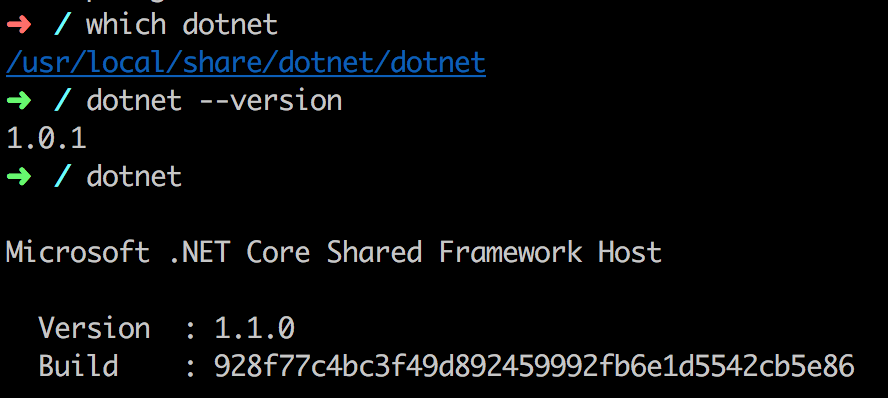
从上面的图中可以看出来DotNetCore的runtime的安装路径,并且发现了没?
我的系统上当前的runtime是1.1.0,很新,但是SDK却只有1.0.1呢?
所以,要升级或者重装一下。
安装
检查Homebrew环境
见我的另外一个帖子,关于Homebrew的使用全部集中在那个帖子了。
安装OpenSSL和其他
官方说明见这里。
brew update
brew install openssl
mkdir -p /usr/local/lib
ln -s /usr/local/opt/openssl/lib/libcrypto.1.0.0.dylib /usr/local/lib/
ln -s /usr/local/opt/openssl/lib/libssl.1.0.0.dylib /usr/local/lib/
过程就不说了,没什么太多的问题,值得记录的,主要是安装OpenSSL之后的结果。见下
==> Downloading https://homebrew.bintray.com/bottles/openssl-1.0.2l.el_capitan.bottle.tar.gz
######################################################################## 100.0%
==> Pouring openssl-1.0.2l.el_capitan.bottle.tar.gz
==> Using the sandbox
==> Caveats
A CA file has been bootstrapped using certificates from the SystemRoots
keychain. To add additional certificates (e.g. the certificates added in
the System keychain), place .pem files in
  /usr/local/etc/openssl/certs

and run
  /usr/local/opt/openssl/bin/c_rehash

This formula is keg-only, which means it was not symlinked into /usr/local,
because Apple has deprecated use of OpenSSL in favor of its own TLS and crypto libraries.

If you need to have this software first in your PATH run:
  echo 'export PATH="/usr/local/opt/openssl/bin:$PATH"' >> ~/.zshrc

For compilers to find this software you may need to set:
    LDFLAGS:  -L/usr/local/opt/openssl/lib
    CPPFLAGS: -I/usr/local/opt/openssl/include

==> Summary
🍺  /usr/local/Cellar/openssl/1.0.2l: 1,709 files, 12.1MB
主要难点是后半段的解释,OpenSSL是一个keg-only的formula,并且由于苹果为了推广使用的TLS算法和加密库,而放弃了OpenSSL。
关于key-only和Homebrew的问题,请移步这个帖子
因此,如果强行link,会引起系统的问题。因此建议用户使用命令
echo 'export PATH="/usr/local/opt/openssl/bin:$PATH"' >> ~/.zshrc
将这次安装的OpenSSL路径写入系统变量,对于像.Net Core这样的编译器来说,需要单独设置。
安装.Net Core的SDK
下面安装SDK或者单独安装Runtime,安装SDK内含Runtime,反过来则不是。我这里下载的SDK内含.Net Core 1.0和1.1。
安装成功后后,有一个提示
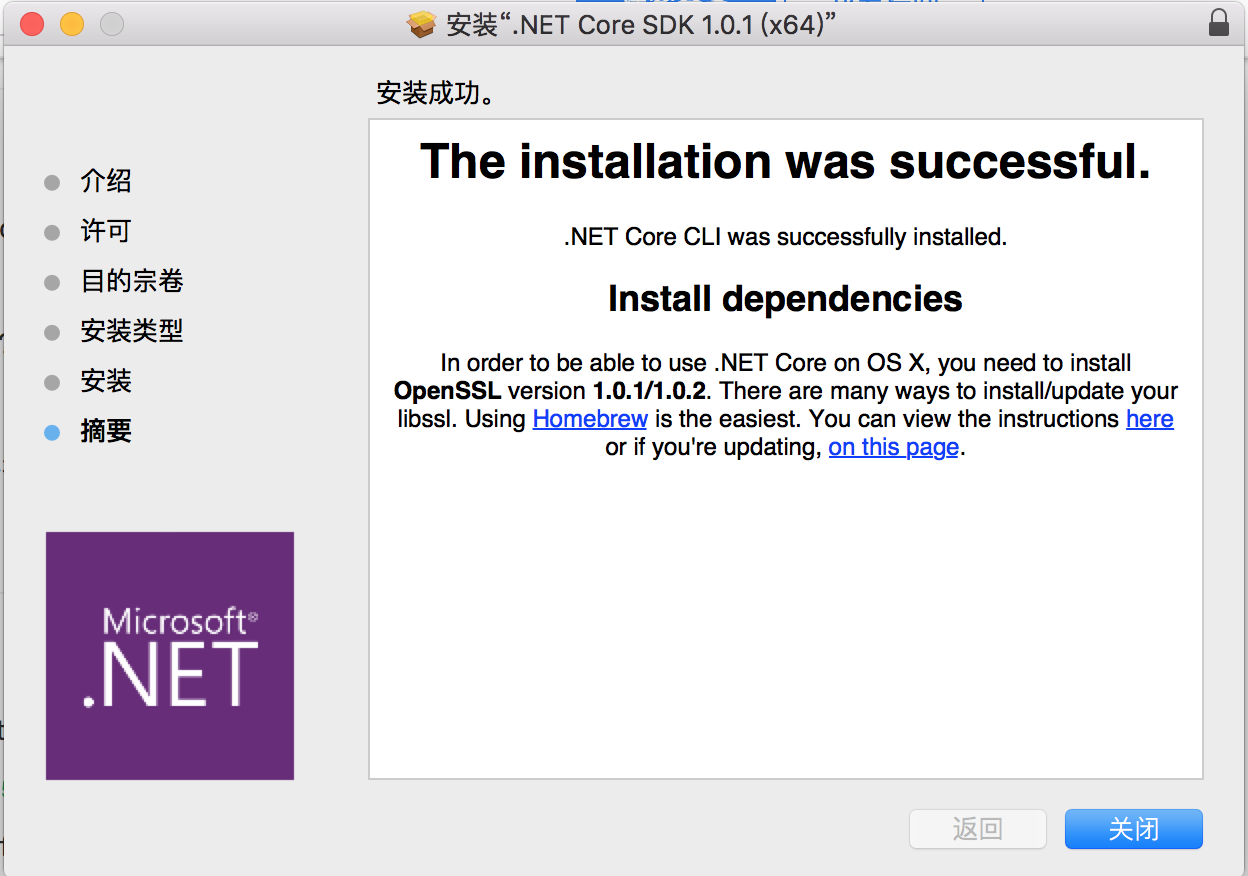
这里有一段话注意事项:
In order to be able to use .NET Core on OS X, you need to install OpenSSL version 1.0.1/1.0.2. There are many ways to install/update your libssl. Using Homebrew is the easiest. You can view the instructions here or if you're updating, on this page.
上文提到的两个链接地址,一个新装OpenSSL步骤,地址见这里,另外一个升级的步骤,地址见这里。
我个人对强行link formula的方式并不是很支持,还是喜欢单独为需要的编译器做单独设置。这个后文再说,目前先不设置。
创建第一个控制台程序
装好了.Net Core CLI,就可以在terminal下试试运行程序了。
dotnet new console -o hwapp
cd hwapp
运行后,.Net Core会自动下载相应的文件,建立起一个应用台程序
Welcome to .NET Core!
---------------------
Learn more about .NET Core @ https://aka.ms/dotnet-docs. Use dotnet --help to see available commands or go to https://aka.ms/dotnet-cli-docs.

Telemetry
--------------
The .NET Core tools collect usage data in order to improve your experience. The data is anonymous and does not include command-line arguments. The data is collected by Microsoft and shared with the community.
You can opt out of telemetry by setting a DOTNET_CLI_TELEMETRY_OPTOUT environment variable to 1 using your favorite shell.
You can read more about .NET Core tools telemetry @ https://aka.ms/dotnet-cli-telemetry.

Configuring...
-------------------
A command is running to initially populate your local package cache, to improve restore speed and enable offline access. This command will take up to a minute to complete and will only happen once.
Decompressing 100% 5738 ms
Expanding 100% 12314 ms
Getting ready...
Content generation time: 246.0067 ms
The template "Console Application" created successfully.
时间用了20秒不到,还可以。
恢复依赖和运行程序
dotnet restore
dotnet run
dotnet restore命令为项目准备了必要的文件
Restoring packages for /Users/wangyi/Desktop/hwapp/hwapp.csproj...
  Generating MSBuild file /Users/wangyi/Desktop/hwapp/obj/hwapp.csproj.nuget.g.props.
  Generating MSBuild file /Users/wangyi/Desktop/hwapp/obj/hwapp.csproj.nuget.g.targets.
  Writing lock file to disk. Path: /Users/wangyi/Desktop/hwapp/obj/project.assets.json
  Restore completed in 1 sec for /Users/wangyi/Desktop/hwapp/hwapp.csproj.

  NuGet Config files used:
      /Users/wangyi/.nuget/NuGet/NuGet.Config

  Feeds used:
      https://api.nuget.org/v3/index.json
dotnet run则是运行该程序。
升级OpenSSL遇到的问题
这里的办法并不十分妥当,我已经不再推荐,但是作为参考还是很好的。
最近要把.NetCore的Runtime从1.0升级到1.1,发现EI CAPITAN上自带的OpenSSL版本是0.98,但是.Net Core对版本的最低需求是1.0.1,所以以为直接升级就可以了
brew install openssl
结果显示
Updating Homebrew...
Warning: openssl is a keg-only and another version is linked to opt.
Use `brew install --force` if you want to install this version
但是遇到了keg-only的提示,
然后硬上弓,输入命令brew install --force openssl
结果提示
Warning: openssl-1.0.2k already installed, it's just not linked.
输入命令
brew link openssl
提示
Warning: Refusing to link: openssl
Linking keg-only openssl means you may end up linking against the insecure,
deprecated system OpenSSL while using the headers from Homebrew's openssl.
Instead, pass the full include/library paths to your compiler e.g.:
  -I/usr/local/opt/openssl/include -L/usr/local/opt/openssl/lib
意思就是说如果你想把keg-only类型的套件symlink的话,不是不可以,但是像openssl这么重要的基础套件,Homebrew建议你不要这么做,而是直接把这个套件的完整路径,直接告诉你所需要的软件,在这里就是需要让.Net Core 1.1知道我们装好的1.0.1k版本的opessl的具体路径,让前者需要的时候去这个特定的路径寻找,而不要使用系统默认的openssl,这样一方面满足了.Net Core的使用条件,另一方面,系统安全性也得到了保证。
如何做呢?
-
如果
/usr/local/bin/openssl存在,则先删除rm /usr/local/bin/openssl -
将以前通过homebrew下载的新版本的openssl链接到
/usr/local/bin/opensslln -s /usr/local/Cellar/openssl/1.0.2k/bin/openssl /usr/local/bin/openssl -
关闭terminal重新打开,再次查看openssl版本
openssl version
多说几句,在查看openssl版本号的时候,我依然显示的0.9.8,没有显示为最新的1.0.2k。怎么回事呢?
问题解决了,原来是没有关闭shell,关闭了,重开,再输入openssl version,就显示为
OpenSSL 1.0.2k 26 Jan 2017
下面的东西,应该不用看了。
先看看默认的openssl来自哪里
which openssl
发现结果来自/usr/bin/openssl,奇怪的是当我查看PATH路径变量的时候,显示的命名是/usr/local/bin排在/usr/bin之前呢?这是为啥呢?没有为啥,因为没有重启terminal。
/usr/local/opt/php56/bin:
    /usr/local/bin:
    /usr/local/sbin:
    /usr/bin:
    /bin:
    /usr/sbin:
    /sbin:
    /usr/local/bin:
    /usr/bin:
    /bin:
    /usr/sbin:
    /sbin:
    /usr/local/share/dotnet
题外话,这里PATH里面很多重复的,真是头疼。